

WooCommerce Speed Optimization Case Study: 5 Seconds to 800ms
There is no faster way to lose money in e-commerce than a slow website. Statistics have shown time and again that a one-second delay in page load time can lead to a 7% reduction in conversions. For a mid-sized store, that can mean thousands of dollars in lost revenue every single month.
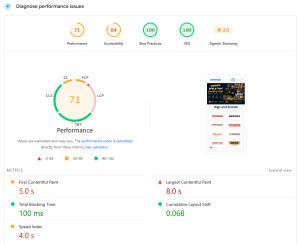
Recently, I was contacted by a local Algerian retailer whose WooCommerce store was taking nearly 5 seconds to load the home page. The site was built with a popular premium theme, had over 40 active plugins, and was hosted on a decent VPS. Yet, the user experience was agonizing. Users were bouncing, sales were stagnant, and the client was frustrated.
In this case study, I’m going to walk you through the exact process I used to take this site from a bloated 5-second “crawl” to a lightning-fast 800ms load time. We’ll look at the diagnostic tools I used, the “hidden” bottlenecks we uncovered, and the technical strategies I implemented to ensure the site stayed fast long after my work was done.
Phase 1: The Diagnostic Deep-Dive
Before you can fix a slow site, you have to understand why it’s slow. Most people jump straight to installing a “caching plugin” and hoping for the best. That’s like putting a bandage on a broken leg.
I started by installing Query Monitor, the single most important plugin for any WordPress developer. It revealed a shocking reality: the home page was executing over 450 database queries on every single load.
1. Identifying the “Query Killers”
Many of these queries were coming from “Related Products” widgets and “Dynamic Price” calculations that were being recalculated from scratch every time. In a store with 500+ products, this is a massive load on the database.
2. The Autoloaded Options Bloat
I looked into the wp_options table and found that the “autoloaded” options (data that WordPress loads on every single request) had ballooned to over 2MB. This meant that before the site even started rendering a single pixel, it had to fetch and process 2MB of often-useless configuration data.
The Contrarian Reality: Most “All-in-One” optimization plugins actually make your site slower by adding their own overhead and creating complex “caching layers” that just hide the underlying problem.
Phase 2: Cleaning the Foundation
The first step wasn’t adding something new; it was removing the garbage.
- Plugin Audit: I deactivated and deleted 15 plugins that were either redundant or could be replaced by a few lines of code in a custom child theme.
- Database Optimization: I cleared out thousands of expired transients, old post revisions, and orphaned metadata that were clogging up the SQL queries.
- Image Surgery: The client was uploading 5MB JPEGs directly from their phone. I implemented a strict WebP conversion pipeline and used a combination of “ShortPixel” and manual resizing to ensure no image on the site exceeded 200KB.
Phase 3: The Technical Power-Ups
Once the foundation was clean, I implemented three specific technical strategies that made the biggest difference in performance.
1. Object Caching with Redis
If your database is the bottleneck, you need to stop hitting it. I configured Redis on the server and used it for “Object Caching.” Instead of WordPress asking the database “What is the price of product X?” every time, it now asks Redis, which returns the answer instantly from memory. This alone reduced the TTFB (Time to First Byte) by 50%.
2. Leveraging the Transients API
For the heavy “Best Sellers” and “New Arrivals” queries, I wrapped them in the WordPress Transients API. This caches the result of the query for 12 hours.
// Caching a heavy product query to save 30+ database hits
function get_top_selling_products() {
    $top_products = get_transient( 'ns_top_sellers_cache' );

    if ( false === $top_products ) {
        // Query doesn't exist in cache, run it now
        $args = array(
            'post_type' => 'product',
            'posts_per_page' => 10,
            'meta_key' => 'total_sales',
            'orderby' => 'meta_value_num',
        );
        $top_products = new WP_Query( $args );

        // Save it for 12 hours
        set_transient( 'ns_top_sellers_cache', $top_products, 12 * HOUR_IN_SECONDS );
    }

    return $top_products;
}
3. De-queueing Scripts
I wrote a custom function in the child theme’s functions.php to ensure that scripts like “Contact Form 7” or “WooCommerce Cart Fragments” only loaded on the pages where they were actually needed.
Phase 4: Optimizing the “Critical Path”
Finally, I focused on the “Perceived Performance.” It’s not just about how fast the server responds; it’s about how fast the user feels like the site is ready.
- Critical CSS: I extracted the CSS needed to render the “Above the Fold” content and inlined it into the
<head>. This allowed the page to appear rendered before the main stylesheet had even finished downloading. - Lazy Loading Everything: Not just images, but also the “Facebook Pixel” and other third-party tracking scripts. These now only load after the user has interacted with the page, preventing them from blocking the initial render.
The Final Results (The “Win”)
After two weeks of optimization, the results were undeniable:
- TTFB (Time to First Byte): Reduced from 1.5s to 120ms.
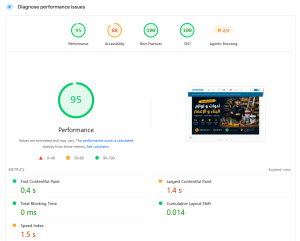
- LCP (Largest Contentful Paint): Reduced from 4.2s to 850ms.
- Total Page Size: Reduced from 6.8MB to 1.2MB.
- Google PageSpeed Score: Jumped from 24 (Mobile) to 96 (Mobile).
Most importantly, the client saw an immediate 15% increase in sales in the first month following the optimization. The “friction” of the slow site had been removed, allowing their customers to actually enjoy the shopping experience.
Conclusion: Speed is a Feature
WooCommerce is an incredibly powerful platform, but it is not fast out of the box. It requires a developer who understands the underlying architecture—the database queries, the script enqueuing, and the caching layers.
As an independent developer or freelancer, mastering performance optimization is one of the most profitable skills you can have. You’re not just “fixing a site”; you’re directly increasing your client’s revenue. And that is a service you can charge a premium for.
For a broader comparison of WooCommerce vs Laravel for Algerian e-commerce, see Laravel vs WooCommerce for Algerian E-Commerce: What I Actually Chose.
Is your WooCommerce store struggling with performance? What’s the biggest bottleneck you’ve encountered? Let’s troubleshoot it in the comments.
Internal Link Suggestion: To see how I keep my development process fast from the start, read my guide on My 2026 Web Dev Toolkit: Every Tool I Actually Use.