

I convert every image to WebP or AVIF before uploading it to a WordPress site. Smaller file size, larger resolution support, and alpha channel transparency in a single modern format. JPEG is still useful for specific scenarios, but most of my images are no longer stored in that format because the alternatives are simply better for the use cases I deal with.
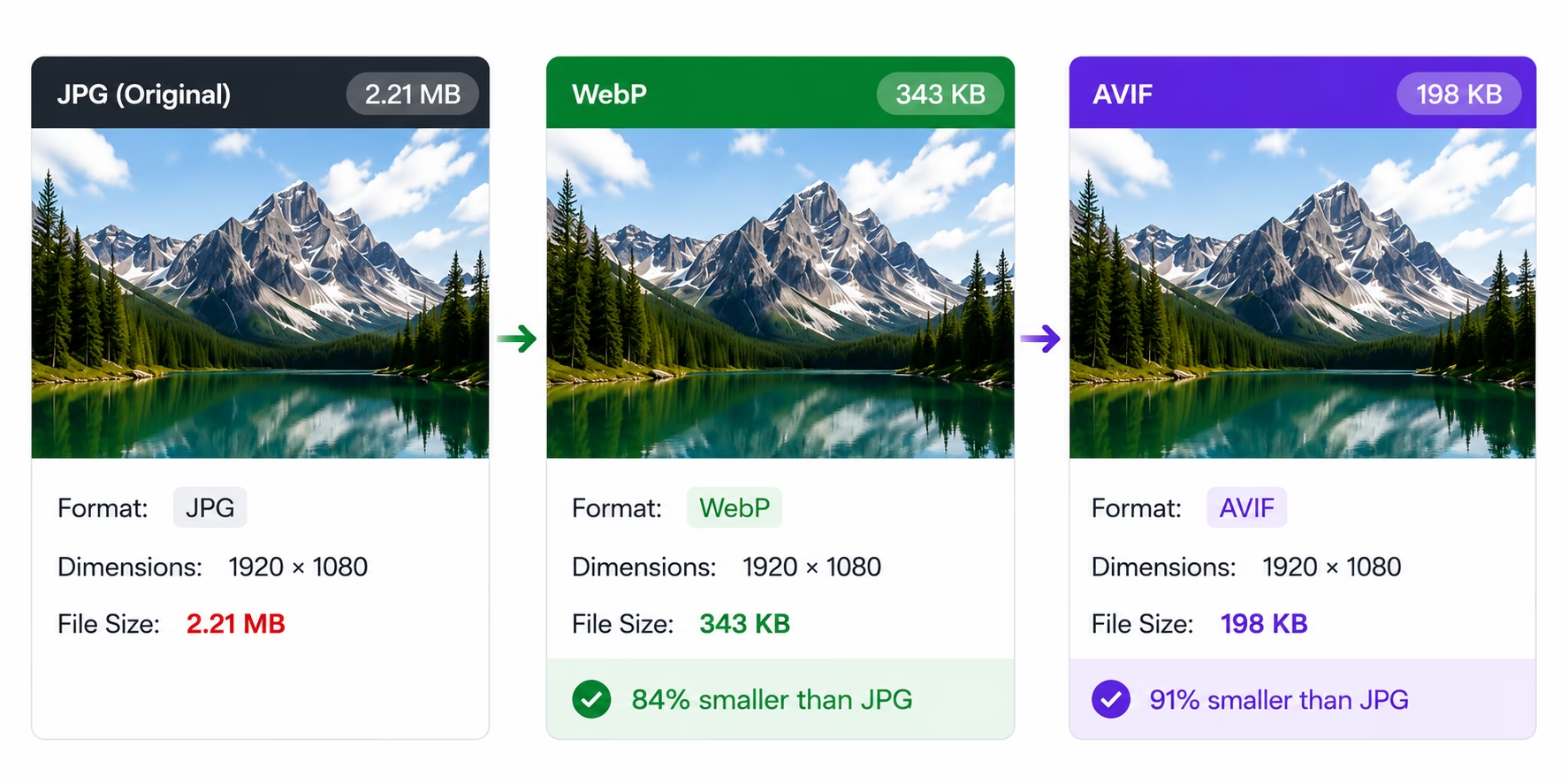
The difference between formats is significant. A high-resolution JPEG at 1920 pixels wide can be 400 to 600KB depending on the image complexity and quality setting. The same image as WebP at equivalent visual quality is typically 150 to 250KB — about half the size with no visible quality loss. AVIF goes even further, compressing to 100 to 180KB for the same resolution and quality level. For a site with multiple images per page — a portfolio gallery, a product catalog, a blog with featured images — the cumulative savings add up quickly. Pages load faster, hosting bandwidth costs decrease, and the user experience improves noticeably, especially on mobile networks where every kilobyte has to be paid for by the visitor.
How I Convert Images
Before uploading any image to a client site or my own site, I convert it manually on my local machine before I even open the WordPress admin. I use cWebP for WebP conversion and AVIFenc for AVIF. The process is straightforward: take the source image, which is usually a PNG exported from a design tool or a high-quality JPEG provided by the client, convert it to the target format with quality settings that balance file size and visual fidelity, and upload the result directly to the WordPress media library. No plugin touches the conversion because I want full control over the output quality and format selection for each image.
I choose between WebP and AVIF based on the image content and browser support considerations. WebP has broader browser compatibility — it works on all modern browsers including older Safari versions — so I default to it for images where reaching the widest possible audience is the priority. AVIF offers roughly 20 to 30 percent better compression for the same visual quality, so I use it for large hero images and detailed product photos where the extra file size reduction matters most. For most client sites where I cannot control what browser the visitor uses, I stick with WebP as the safer option.
WebP’s alpha channel support is a practical advantage over JPEG that I use regularly. Images with transparent backgrounds — client logos, UI icons, product cutouts with drop shadows — previously required the PNG format, which produced larger files than JPEG for the same resolution. WebP handles transparency with file sizes noticeably smaller than equivalent PNGs, which means faster loading for design elements that previously required the bulkier format. A logo that was 120KB as PNG can be 40KB as WebP with identical transparency and visual quality.
Why Manual Conversion Instead of a Plugin
WordPress plugins exist that automatically convert uploaded images to WebP on the server. I have tested a few of them, and they work reasonably well for basic use cases where the default compression settings are acceptable. But they add server-side processing time to every upload, they can conflict with caching plugins and CDN configurations, and they rarely give me control over per-image quality settings. For a single product photo on a WooCommerce site, I want to adjust the compression ratio based on the image content — a detailed portrait shot of a person needs higher quality than a flat product shot of a box on a white background. A plugin cannot make that distinction.
Manual conversion also means the optimized image is what gets permanently stored in the media library. There is no processing delay when the image is first requested by a visitor. No PHP memory limit issues during conversion of large resolution files on budget shared hosting. No dependency on a conversion plugin that might stop being maintained or break after a WordPress update. The image is ready the moment it is uploaded, and it remains in the optimized format for the lifetime of the site.
The Measurable Impact
The performance gain from using WebP and AVIF is visible in Lighthouse scores and in real-world loading times measured from actual visitor connections. Largest Contentful Paint improves because the hero image loads faster as a smaller file. Total page weight drops by 40 to 60 percent on image-heavy pages, which matters enormously for visitors on 3G and 4G networks in Algeria where bandwidth per user is limited and network latency is high compared to European or North American connections. A page that loads in three seconds with JPEG images can load in under two seconds with the same images converted to WebP or AVIF at the same visual quality.
I confirmed this on my own site during the Core Web Vitals optimization I described in an earlier post. The hero image on my homepage went from a 480KB JPEG to a 180KB WebP with no visible quality difference when viewed on the same monitor. That single 300KB reduction on the first loaded image contributed measurably to the LCP improvement from 4.2 seconds to 1.8 seconds on mobile network simulation. Image optimization is not the only factor in overall performance, but it is consistently one of the easiest and most reliable wins available to any WordPress developer regardless of budget or technical setup.
My Take
Converting images to WebP and AVIF before uploading is a simple habit that takes an extra thirty seconds per image and pays back on every page load for the entire lifetime of the site. For developers working in markets where mobile data costs are high relative to income and network speeds are inconsistent, every kilobyte of unnecessary image data matters. JPEG is not dead — it still has valid use cases where compatibility with very old browsers or specific image editing workflows requires it. But for the vast majority of modern web images — product photos, portfolio images, blog featured images, hero backgrounds, logo files — WebP and AVIF are the better choices by every practical metric. The conversion tools are free, the manual process is fast once it becomes routine, and the user experience improvement is real, measurable, and immediately visible in performance benchmarks.